Configuring notifications
Notifiers control when and how VulnPilot alerts you about vulnerabilities that match your watchlists.
When you create a watchlist, VulnPilot seeds a set of recommended email notifiers (for example Immediate, Out-of-Cycle, Weekly Digest, and Exploit Alerts). You can enable or disable them, refine their filters and schedules, or create additional notifiers — including webhooks on eligible plans.
Where to configure notifiers
You can manage notifiers from two places:
- Notification settings — open Notifications from the sidebar to see every watchlist and its notifiers in one place.
- Watchlist details — open a watchlist from the watchlist page, then use the Notifications card on that watchlist.
Both surfaces share the same configuration panel. You need permission to edit notifiers on the watchlist to create, update, or delete them. Users without that permission can still view and enable or disable notifiers if your organization allows it through existing access.
Enable or disable a notifier
Each notifier has a switch:
- On — VulnPilot may send notifications according to the schedule and filters.
- Off — the notifier is kept but does not fire.
Use this when you want to mute a channel temporarily without deleting the configuration.
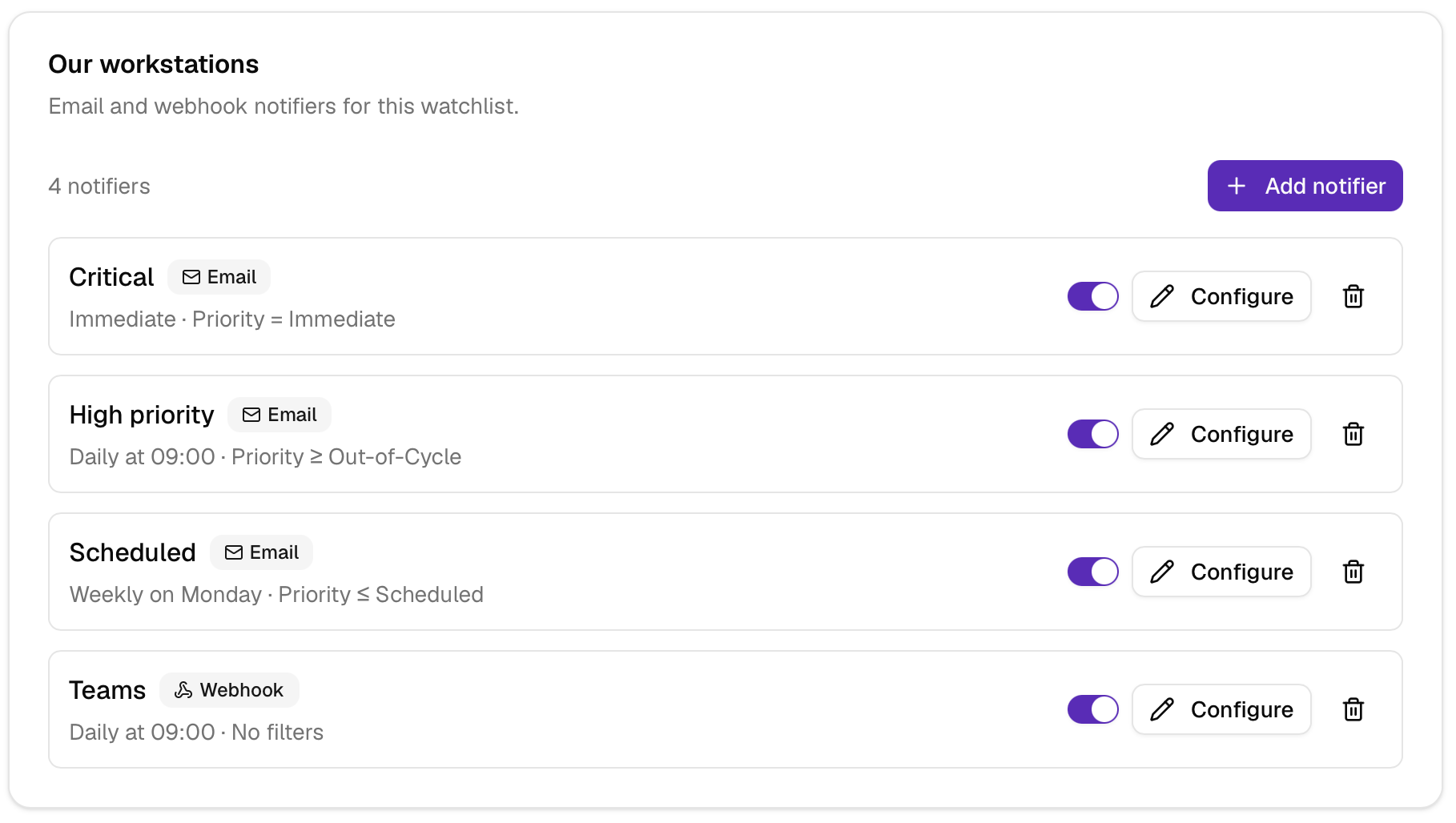
Each watchlist lists its notifiers with the schedule, the filters, a switch, Configure, and delete. Add notifier creates another one.
Add or edit a notifier
Click Add notifier to create one, or Configure on an existing notifier.
In the configuration sheet you can set:
| Field | Description |
|---|---|
| Name | A label shown in the list (for example “Critical Immediate”). |
| Type | Email or Webhook. Type is chosen at creation and cannot be changed later. |
| Schedule | When matching events should trigger the notifier (see below). |
| Filters | Which events qualify (priority and/or public exploitation). |
| Webhook options | URL, JSON template, and headers (webhook type only). |
Click Save to apply changes. For webhooks, you can then use Test webhook (see below).
Schedules
The schedule defines when a matching event produces a notification:
- Immediate — send as soon as a matching vulnerability event is processed.
- Daily — batch matching events and send once per day at the chosen hour (0–23).
- Weekly — send once per week on the chosen weekday.
- Monthly — send once per month on the chosen day of the month.
Immediate is best for high-priority alerts. Daily, weekly, or monthly schedules help reduce noise for lower-priority digests.
Filters
Filters are combined with AND: an event must satisfy every filter on the notifier.
Priority
Priority filters map to BeeScore bands:
| Priority | BeeScore band |
|---|---|
| Defer | 0 – 2.4 |
| Scheduled | 2.5 – 4.4 |
| Out-of-Cycle | 4.5 – 6.4 |
| Immediate | 6.5 – 10 |
When you add a priority filter, choose a comparison (≥, ≤, or equals) and a priority label. VulnPilot stores the corresponding BeeScore threshold behind the scenes.
Public exploitation
Add an Exploit filter to limit the notifier to vulnerabilities with public exploitation signals. This is how the recommended Exploit Alerts notifier is scoped.
Leave filters empty if the notifier should match all items for that watchlist on its schedule (useful for a weekly digest).
Email notifiers
Email notifiers deliver alerts to the members of the watchlist. Recipients stay in sync when you add or remove watchlist members.
Email body templates are managed by VulnPilot and are not edited in this panel.
Webhook notifiers
Webhook notifiers POST a JSON payload to an HTTPS endpoint you control (for example a SOAR, ticketing, or chat integration).
Plan requirement
Creating and maintaining webhook notifiers requires an organization plan that includes webhook configuration. If your plan does not include webhooks, the UI shows an upgrade notice and the webhook type is unavailable.
Configuration fields
- Webhook URL — destination that accepts HTTP POST requests.
- JSON template — a Handlebars source string that must render to a JSON object. On create, a template is required. When editing, leave the field blank to keep the existing template, or paste a new source string to replace it. See Webhook JSON templates for available fields and examples.
- Additional headers — optional key/value HTTP headers sent with each delivery (for example authentication tokens).
Suggested templates
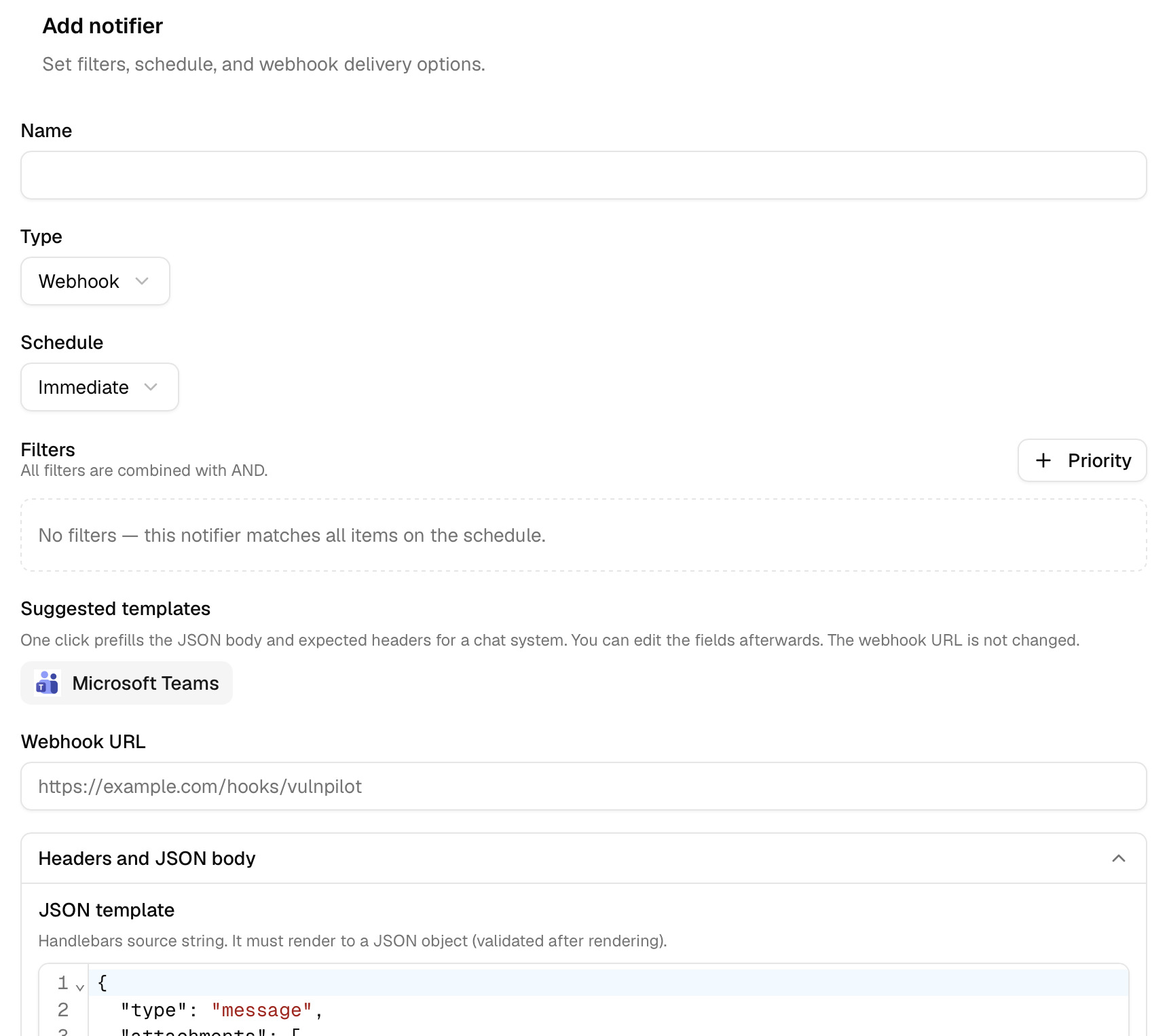
If your organization can configure webhooks, the notifier panel may show suggested templates for common chat systems (for example Slack or Microsoft Teams). Each suggestion is maintained by VulnPilot operators and includes a logo, expected HTTP header names, and a JSON body template.
Click a suggestion to prefill the JSON template and headers. The webhook URL is not changed — you still paste the destination for your workspace. After applying a suggestion you can edit any field before saving.
A webhook notifier sets the type to Webhook, then the schedule, filters, URL, and JSON body. A suggested template, such as Microsoft Teams, fills the body and headers.
VulnPilot does not create webhooks endpoints on your behalf. This feature still requires you to manually configure the webhook in your chat system. Check your chat system’s documentation for instructions.
Webhook JSON templates
Each delivery renders your Handlebars source string against a notification context, then validates that the rendered output is a JSON object. Because the template is stored as a string, Handlebars control blocks ({{#each}}, {{#if}}, {{#unless}}, …) may appear outside JSON string literals.
The root context exposes:
| Field | Type | Description |
|---|---|---|
title | string (optional) | Notification title. |
body | string (optional) | Free-text body. It is formatted using Markdown syntax. |
watchlists | array | Watchlists included in this notification, each with their associated action plans. |
watchlists[] — NotificationWatchlistGroup
| Field | Type | Description |
|---|---|---|
watchlist | object | Watchlist identity for this group. |
action_plans | array | Action plans belonging to this watchlist. |
watchlist — NotificationWatchlist
| Field | Type | Description |
|---|---|---|
watchlist_id | number | Watchlist id. |
watchlist_name | string | Watchlist name. |
action_plans[] — NotificationActionPlan
| Field | Type | Description |
|---|---|---|
action_plan_id | number | Action plan id. |
title | string | Action plan title. |
descriptions | array of multilingual descriptions | Localized descriptions (lang, value, optional description_type / tags). Value is usually formatted using Markdown |
processing_status | string (optional) | One of new, pending, ongoing, completed, dismissed. |
tags | array | Structured tags on the action plan. Prefer tag_labels for display. |
vulnerabilities | array | Vulnerabilities associated with the plan (may be truncated). |
total_vulnerability_count | number | Total vulnerabilities before truncation. |
has_more_vulnerabilities | boolean | true when more vulnerabilities exist than listed. |
watchlist_name | string | Watchlist name. |
priority | string (optional) | Highest priorization priority across vulnerabilities. |
tag_labels | array of strings | Human-readable tag labels for headers. |
summary | string (optional) | Summary section content. |
impacts | string (optional) | Impacts section content. |
detection | string (optional) | Detection section content. |
vendor_rows | array | Vendor/product rows. |
total_vendor_row_count | number | Total vendor/product rows before truncation. |
has_more_vendor_rows | boolean | true when more vendor/product rows exist than listed. |
references | array of strings | Reference URLs. |
total_reference_count | number | Total references before truncation. |
has_more_references | boolean | true when more references exist than listed. |
related_cves | array | Related CVE link objects. |
action_plan_url | string | URL to open the full action plan in VulnPilot. |
vulnerabilities[] — NotificationVulnerability
| Field | Type | Description |
|---|---|---|
vulnerability_id | string | Sentibee vulnerability id (STB-xxxx-xxxx). |
displayed_vulnerability_id | string | Id shown to users (for example a CVE). |
beescore | number (optional) | Personalized BeeScore. |
beescore_priority | string (optional) | Priority band derived from the personalized score. |
priorization_level | string (optional) | One of Defer, Scheduled, OutOfCycle, Immediate. |
cvss_score | number (optional) | CVSS score. |
vendor_name | array of strings | Related vendor names. |
product_name | array of strings | Related product names. |
description | array of multilingual descriptions | Localized vulnerability descriptions. |
references | array of strings | Vulnerability reference URLs. |
tags | array | Structured vulnerability tags. |
Handlebars tips
- Use
{{title}}/{{body}}for root scalars. - Iterate with
{{#each watchlists}}…{{/each}}, and nest{{#each action_plans}}/{{#each vulnerabilities}}. - Inside a loop, the current item is the context (for example
{{watchlist.watchlist_name}},{{title}}on an action plan). - Optional fields may be empty; guard with
{{#if priority}}…{{/if}}when needed. - The template source itself is not required to be valid JSON. After Handlebars runs, the result must be a JSON object (not an array or scalar). Quote string fields and use
{{#unless @last}},{{/unless}}between array items.
Example — compact summary
Useful for chat or ticketing integrations:
{
  "title": "{{title}}",
  "body": "{{body}}",
  "watchlists": [
    {{#each watchlists}}
    {
      "id": {{watchlist.watchlist_id}},
      "name": "{{watchlist.watchlist_name}}",
      "action_plans": [
        {{#each action_plans}}
        {
          "id": {{action_plan_id}},
          "title": "{{title}}",
          "priority": "{{priority}}",
          "url": "{{action_plan_url}}",
          "vulnerability_count": {{total_vulnerability_count}},
          "tags": [
            {{#each tag_labels}}
            "{{this}}"{{#unless @last}},{{/unless}}
            {{/each}}
          ]
        }{{#unless @last}},{{/unless}}
        {{/each}}
      ]
    }{{#unless @last}},{{/unless}}
    {{/each}}
  ]
}After Handlebars runs, the result must be a JSON object. Use {{#unless @last}},{{/unless}} between array items, and quote string fields. Optional values may render empty — guard with {{#if …}} when your consumer requires non-empty fields.
Example — action plans with top vulnerabilities
{
  "notification_title": "{{title}}",
  "items": [
    {{#each watchlists}}
      {{#each action_plans}}
      {
        "watchlist": "{{watchlist_name}}",
        "action_plan": "{{title}}",
        "priority": "{{priority}}",
        "url": "{{action_plan_url}}",
        "summary": "{{summary}}",
        "vulnerabilities": [
          {{#each vulnerabilities}}
          {
            "id": "{{displayed_vulnerability_id}}",
            "beescore": {{#if beescore}}{{beescore}}{{else}}null{{/if}},
            "priority": "{{beescore_priority}}",
            "cvss": {{#if cvss_score}}{{cvss_score}}{{else}}null{{/if}},
            "products": [
              {{#each product_name}}
              "{{this}}"{{#unless @last}},{{/unless}}
              {{/each}}
            ],
            "vendors": [
              {{#each vendor_name}}
              "{{this}}"{{#unless @last}},{{/unless}}
              {{/each}}
            ]
          }{{#unless @last}},{{/unless}}
          {{/each}}
        ],
        "has_more_vulnerabilities": {{has_more_vulnerabilities}}
      }{{#unless @last}},{{/unless}}
      {{/each}}{{#unless @last}},{{/unless}}
    {{/each}}
  ]
}
Example — minimal ping
{
  "text": "{{title}} — {{body}}"
}
Test a webhook
After you Save a webhook notifier:
- Keep the configuration sheet open (or open Configure again).
- Click Test webhook.
- Review the result: success or failure, HTTP status when available, and the payload that was sent.
Delete a notifier
Use the delete action on a notifier row, then confirm. Deletion is permanent. Prefer disabling the notifier if you may need it later.
Recommended defaults
New watchlists receive these email notifiers by default:
| Name | Typical purpose |
|---|---|
| Critical Vulnerabilities | Immediate priority, immediate schedule |
| Out-of-Cycle Vulnerabilities | Out-of-Cycle band, daily digest |
| Weekly Digest | No filters, weekly schedule |
| Exploit Alerts | Public exploitation, immediate schedule |
You can refine or replace them to match your team’s process.
Frequently asked questions
Why don’t I see the webhook type?
Your organization plan does not allow webhook notifiers, or you lack permission to edit notifiers. Contact your organization administrator or Sentibee to upgrade.
Can I change an email notifier into a webhook?
No. Create a new webhook notifier instead. You can disable or delete the email notifier if it is no longer needed.
Why is the JSON template empty when I edit a webhook?
The stored template is not returned to the UI for security and size reasons. Leave the field empty to keep the current template, or enter a complete Handlebars source string to replace it.
Who receives email notifications?
Watchlist members. Organization administrators who are not members of a given watchlist are not automatically added as recipients for that watchlist’s email notifiers.