Collaborate with Sentibee
VulnPilot enables secure collaboration with Sentibee to help you manage watchlists and action plans more effectively. As an organization administrator, you can grant Sentibee time-limited access to specific watchlists or action plans, allowing our team to assist with resolution, updates, and optimization.
This feature is built on explicit consent and time-bound access principles. You retain complete control and can revoke access at any time.
Action plan assistance is a paid add-on billed based on usage. See Request action plan assistance. Granting Sentibee access to a watchlist is available on Business and Enterprise plans.
When to request assistance
Consider granting Sentibee access when you need help with:
- Resolving false positives or tuning your watchlist configuration
- Investigating complex vulnerabilities and their impact on your environment
- Understanding and acting on VulnPilot recommendations
Grant watchlist access to Sentibee
You can allow Sentibee to view and edit a specific watchlist on your behalf.
Steps to grant access
- Navigate to the Watchlists page
- Click on the watchlist you need help with
- Scroll down to the “Sentibee Access” section
- Select the duration of access:
- 7 days (recommended for most requests)
- 14 days
- 30 days (maximum)
- Optionally, add a reason in the text field to describe what you need help with (e.g., “Investigate false positive for CVE-2026-12345”)
- Click “Allow Access”
The access is granted immediately, and Sentibee’s support team is notified.
What Sentibee can do with watchlist access
With your consent, Sentibee users can:
- View the complete watchlist configuration, including products, vendors, and settings
- Edit the watchlist name and items
- Modify the sensitivity level and processing status
- Update watchlist configuration
- View and edit related action plans for that watchlist
Manage active grants
All active grants for the watchlist are displayed in a table within the same section. For each grant, you can see:
- Permissions granted (Edit)
- Expiration date
- Reason (if provided)
To revoke access before it expires, click the “Revoke” button next to the grant. Access is removed immediately.
Request action plan assistance
You can allow Sentibee to help manage and update tasks in a specific action plan.
Action plan assistance is a paid add-on billed based on usage. It is not part of the base subscription. Each time an organization administrator grants access to an action plan, one assistance is consumed. Your plan may include a starting balance. Further assistances are purchased from the billing page, under Addons, and the charge follows how many assistances you use.
The Sentibee Assistance section shows the remaining balance before you confirm. If the add-on is not on the current plan, that section says assistance is not included. Revoking a grant removes Sentibee’s access. It does not return the assistance that was consumed.
Steps to grant access
- Navigate to the Action Plan page
- Find and click on the action plan you need help with
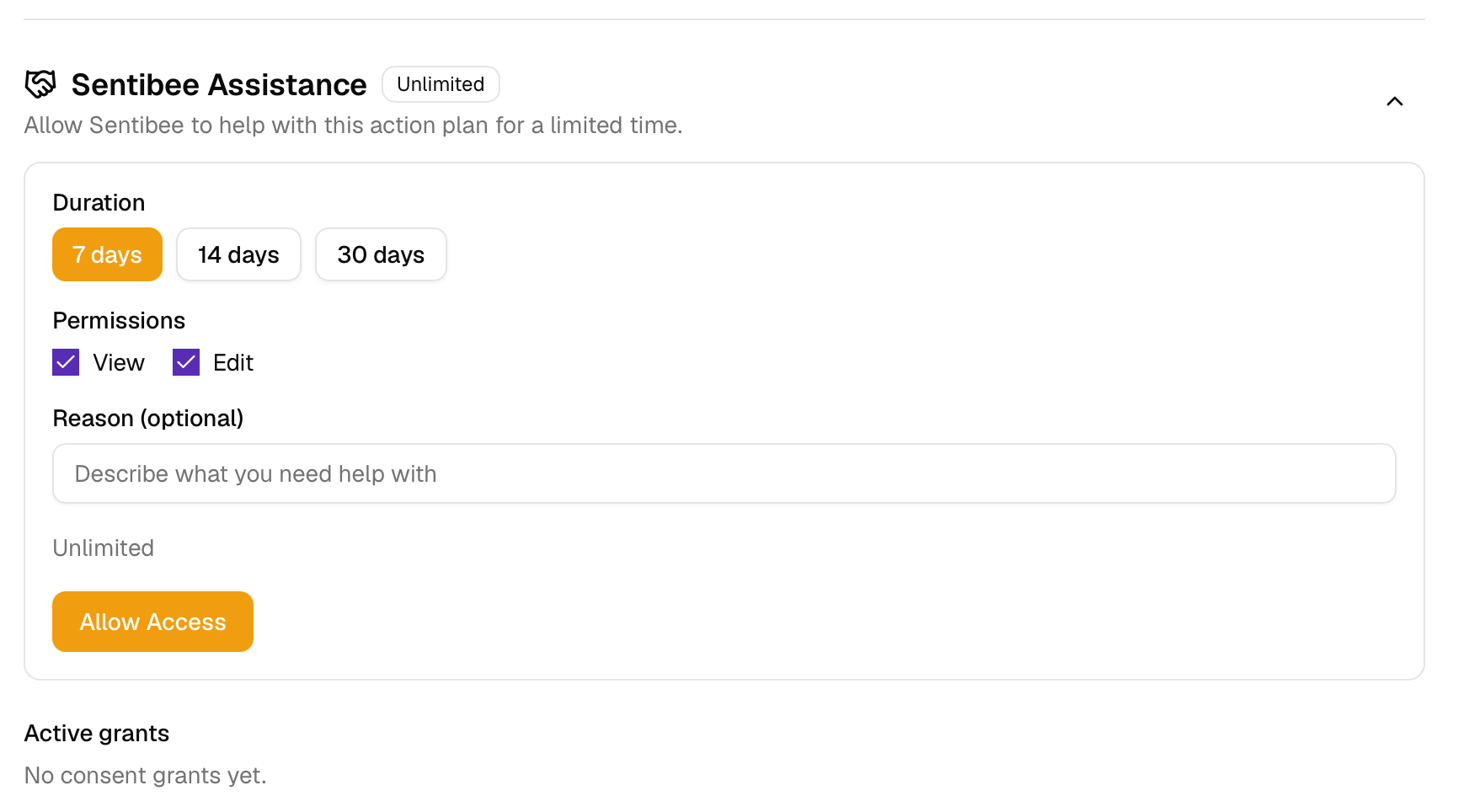
- In the action plan details, scroll to the “Sentibee Assistance” section. It may be collapsed by default.
- Select the duration of access (7, 14, or 30 days)
- Select the permissions you want to grant:
- View: Allow Sentibee to see the action plan details
- Edit: Allow Sentibee to update action plans
- Optionally, add a reason describing your request
- Click “Allow Access”, then confirm. The confirmation states that this uses 1 assistance credit.
The section shows the remaining balance, the duration, the permissions, and an optional reason. Active grants lists access that is still open.
What Sentibee can do with action plan access
With your consent, Sentibee users can:
- View and edit the action plan details, including vulnerabilities, recommendations, and timeline
- Update task statuses (To Do, In Progress, Done, Dismissed)
- View related vulnerabilities and their context
Sentibee users cannot make changes without an active consent grant for that specific action plan.
Manage active grants
Similar to watchlist grants, all active action plan grants are displayed in a table. You can revoke access at any time.
Best practices
For organization administrators
- Be specific: Include clear reasons to help Sentibee understand your needs quickly
- Revoke promptly: Remove access as soon as the issue is resolved
- Communicate: Use the reason field to provide context about urgent issues
Frequently asked questions
Who can grant access to Sentibee?
Only organization administrators can grant access to Sentibee. Regular organization members cannot grant consent, even if they have edit permissions on a watchlist.
Can I grant access to multiple watchlists or action plans at once?
No. Consent must be granted individually for each watchlist or action plan. This ensures fine-grained control and allows you to specify different durations and reasons for each request.
What happens when access expires?
When a grant expires, Sentibee users can no longer access the watchlist or action plan. All changes made during the access period are preserved. You will need to grant new access if you require further assistance.
Is there a limit to how many grants I can create?
Watchlist grants have no fixed cap. Each grant should still be purposeful and time-bound. Excessive or unnecessary grants may be flagged for review.
Action plan assistance is limited by usage. You can grant access only while assistances remain on the add-on. Buy more from Billing when the balance is used up.
What if I need help urgently?
For urgent requests:
- Grant access with a 7-day duration
- Include “URGENT” or “PRIORITY” in the reason field
- Describe the specific issue or vulnerability
Sentibee’s backoffice team receives notifications of all new consent grants and will prioritize urgent requests accordingly.
Can Sentibee access my data without my consent?
No. Sentibee users cannot access any customer watchlist or action plan without an active, explicit consent grant from an organization administrator.
What permissions does Sentibee have by default?
For watchlists, the default permission is Edit, which allows Sentibee to modify the watchlist configuration and items. For action plans, you can choose between View and Edit permissions.
Can I grant access to specific Sentibee team members?
Currently, consent is granted to Sentibee’s backoffice team as a whole, not to individual users. Sentibee’s internal systems ensure that only authorized and trained personnel can access customer data, and all accesses are logged.
What happens if I revoke access while Sentibee is working?
Access is revoked immediately. Any changes already made are saved, but Sentibee users cannot make further modifications. If work was in progress, you may need to grant access again or complete the changes yourself.
Need help?
If you have questions about the collaboration features or need assistance with a specific request, contact Sentibee support through the platform or your designated account manager.